A dual-pane file manager for Mac
Two panes.Familiar keys.
Work the Total Commander way on your Mac. Built natively for Apple silicon.

Pro is a one-time payment with lifetime updates.
- F3View
- F4Edit
- F5Copy
- F6Move
- F7New folder
- F8Delete
Leo Commander in action
Watch the demo
- Switch panes with Tab and copy with F5.
- Open a ZIP and find files.
- Preview a batch rename before applying it.
Same views and tools as Total Commander
Views and tools for everyday work.
Real screenshots from Leo Commander. Pick a tab.
Views


Tools
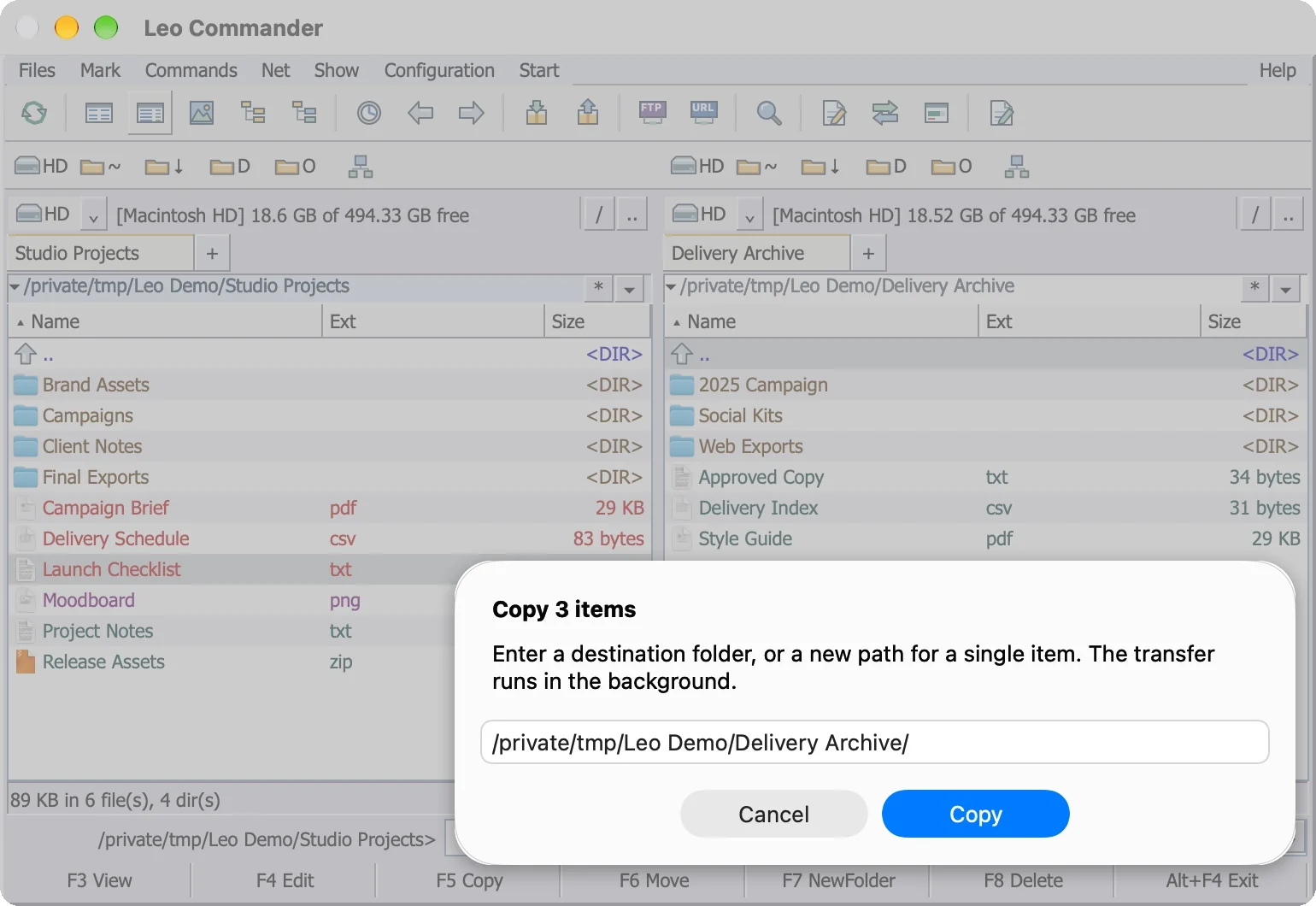
F5 copies, exactly like before.
Mark files, press F5, check the destination and press Copy. The copy runs in the background while you keep working.
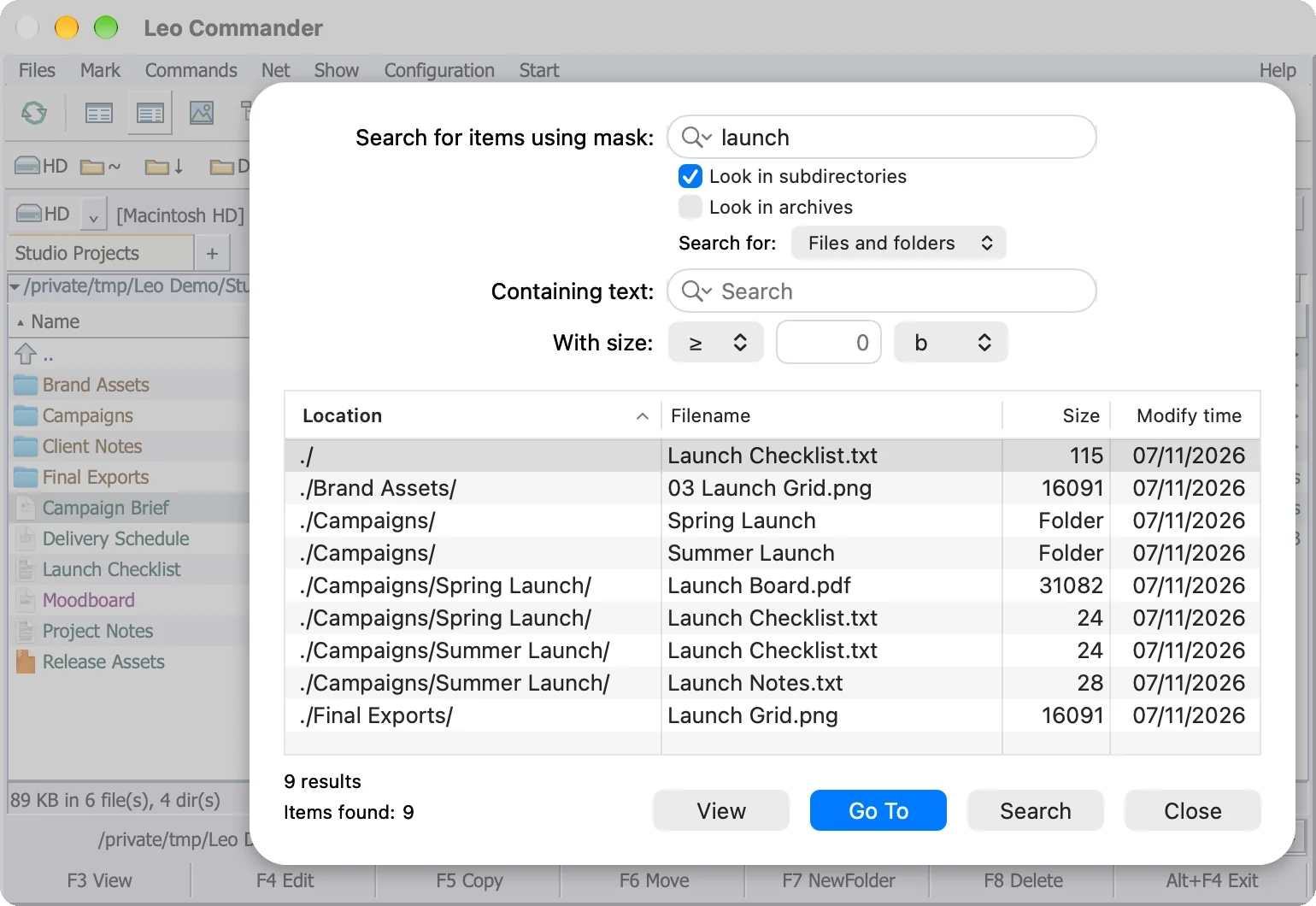
Find any file, then go straight to it.
Search by name mask, text inside files or size. Tick Look in archives to search inside ZIP files too. View a match, or press Go To and the panel jumps to its folder.
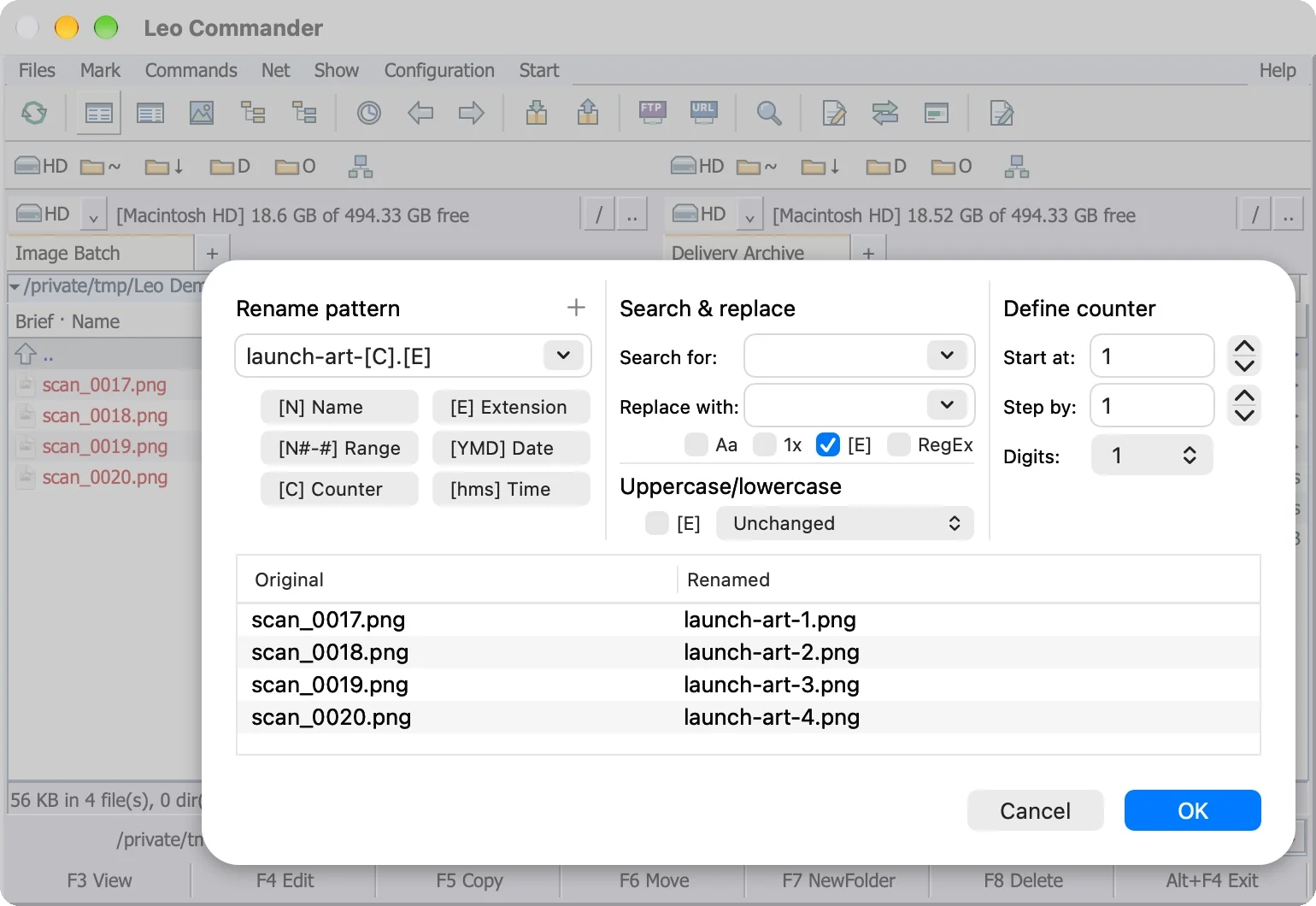
Rename a batch of files in one go. See every new name first.
Pro. Mark the files, then build names from [N] name, [E] extension, [C] counter, [YMD] date and more. The preview shows each new name before you press OK.
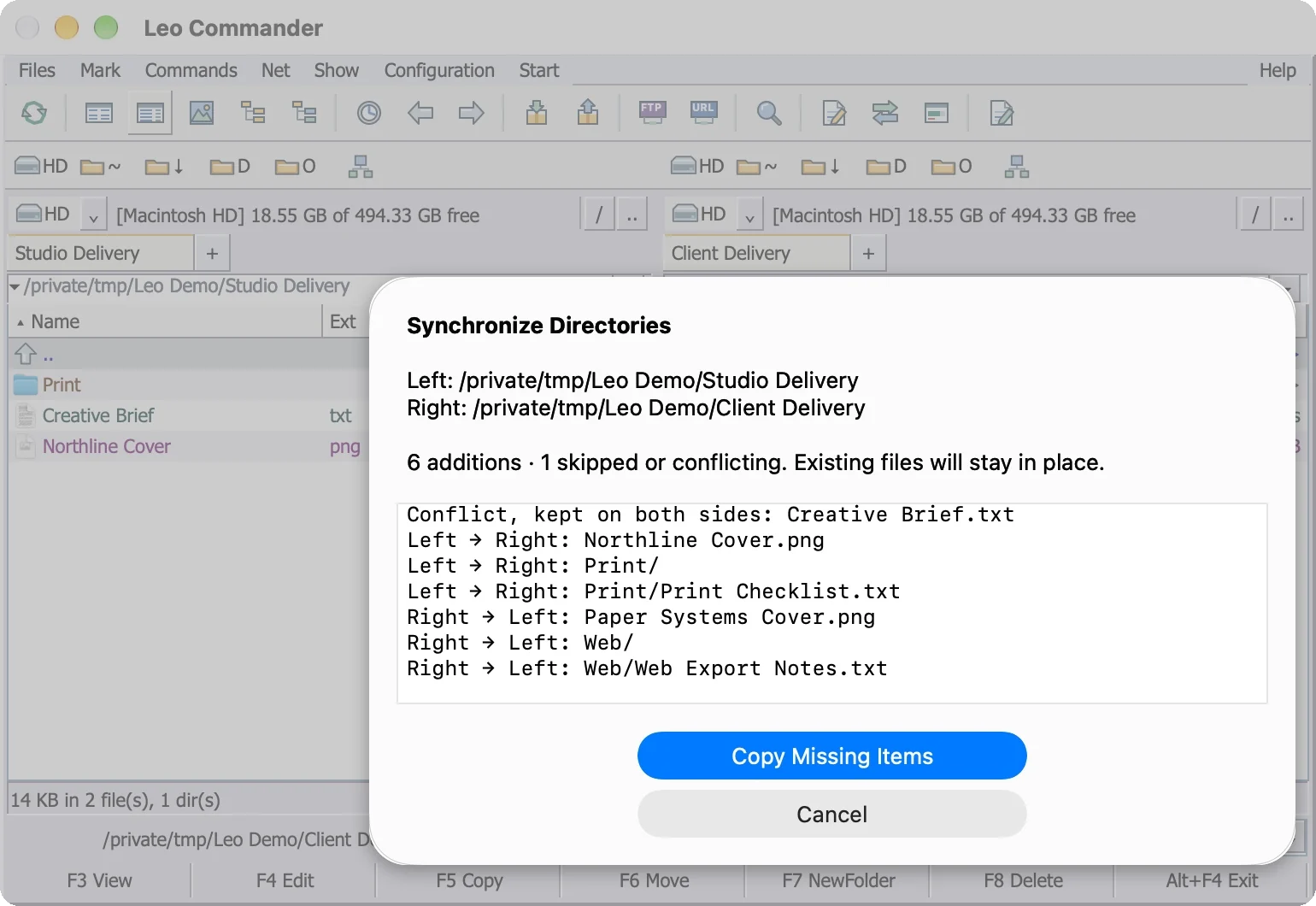
Two folders in sync, with no surprises.
Pro. Open one folder on each side. Leo Commander compares the two folders by content and lists every copy before it happens. Missing files go both ways; files that differ stay unchanged.
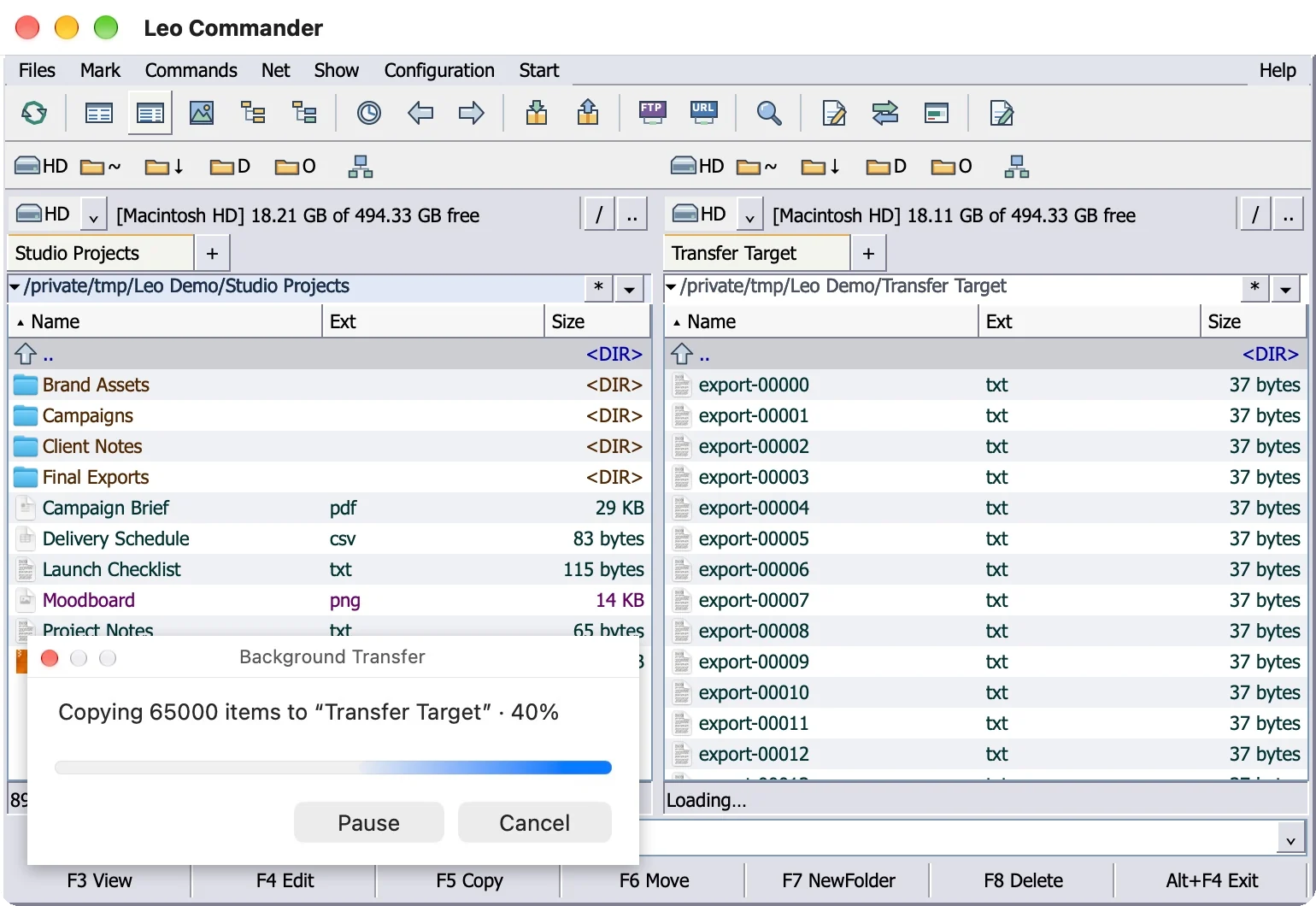
Big copy? Keep working.
Copy, move and sync run in the background. Pause or cancel at any time, and browse other folders in the meantime.
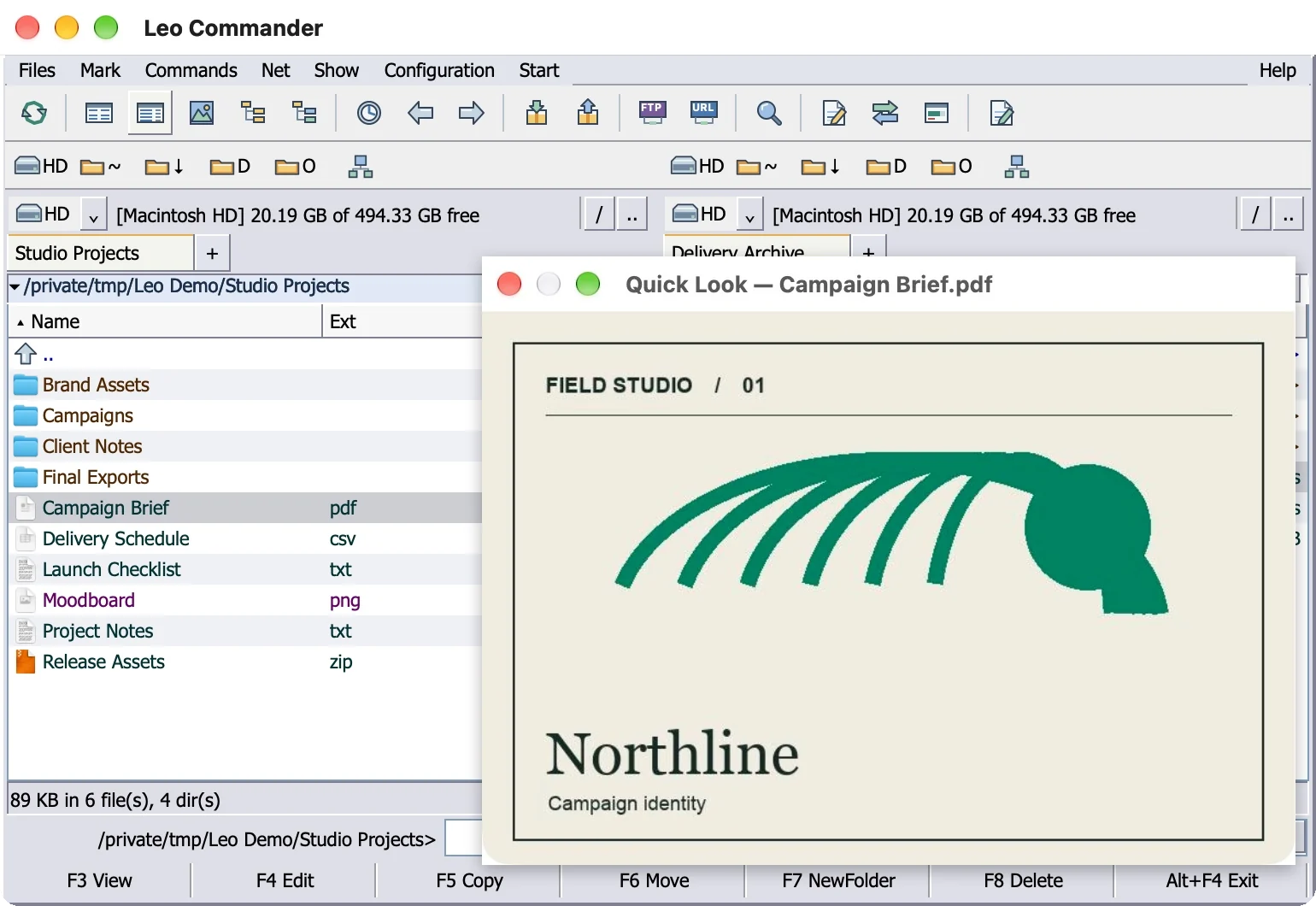
Peek at any file.
⌘Y opens Quick Look, the Mac's own previewer, next to the selected file. F3 still opens the
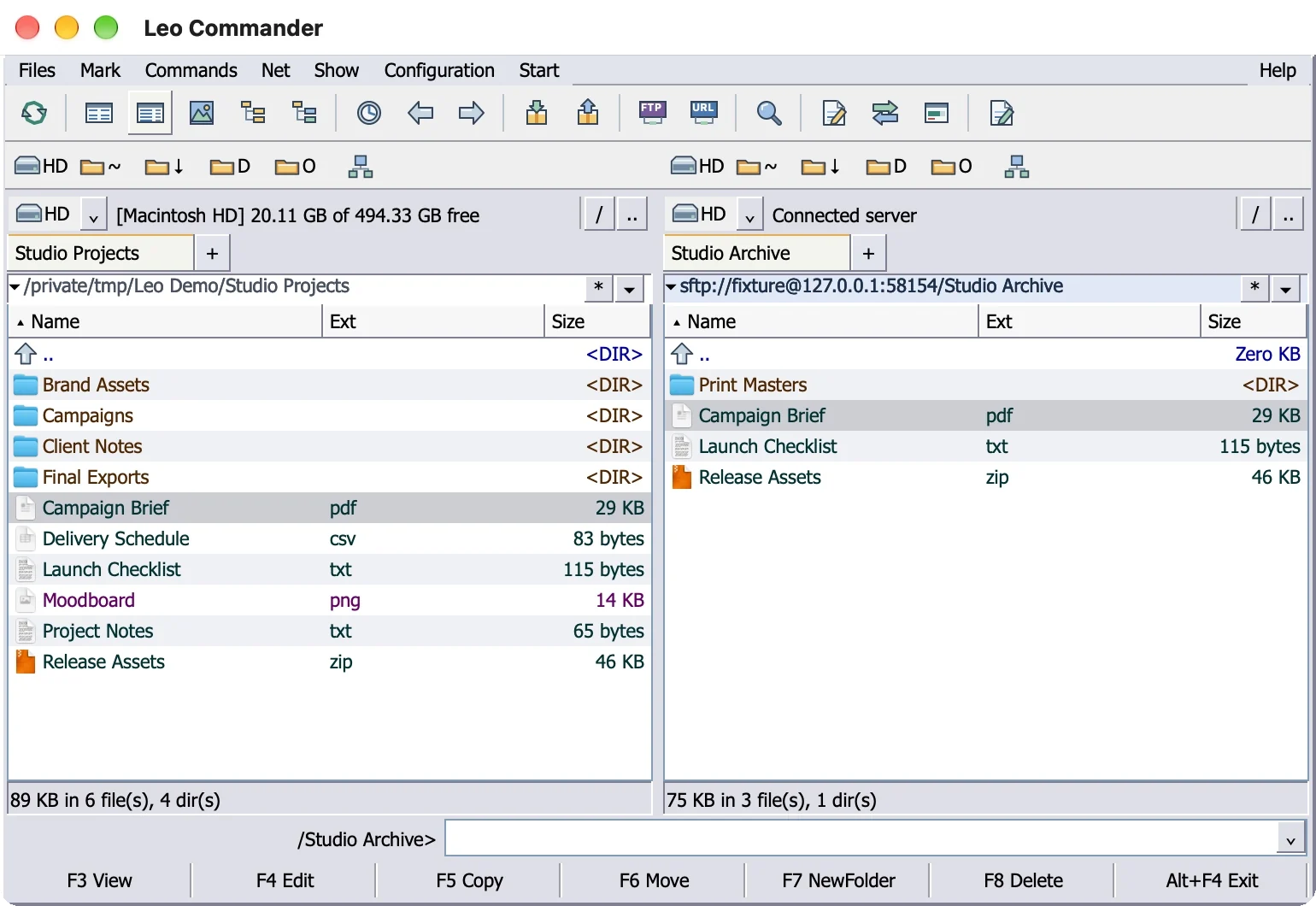
Servers open in a panel.
Pro. Connect to an FTP, SFTP or WebDAV server and browse the server like a folder. F5 copies between your Mac and the server.
Daily habits

Pack and Unpack
Create and extract ZIP files, and open ZIP files like folders.

Marking files
Space marks a folder and shows its size. Insert or Shift+Down marks and moves on.

Folder tabs
⌘T opens a tab on either side, ⌘W closes it. Tabs come back when you relaunch.

Directory hotlist
⌘B saves a folder to Favorites, ⌘D opens the list.

Type a path
⌘L or ⇧⌘G edits the path. The command line takes cd.

Safe deletes
F8 asks first and uses the Trash. Name clashes ask: keep both or abort.

Cut and paste files
⌘X dims the files. ⌘V moves the files into the open folder.

Native on Apple silicon
An AppKit app compiled for arm64. No emulator, no Windows underneath.
Pricing
Start free. Add Pro when you need it.
Both editions give you the same two panes and familiar shortcuts. Pro adds batch rename, folder sync and server connections.
Free
$0Free to use
The Total Commander workflow for Mac
macOS 12 or later. No account needed.
- Two panels with the Total Commander layout and menus
- F3 View, F4 Edit, F5 Copy, F6 Move, F7 New folder, F8 Delete
- Command line, drive bar and
F-key bar - Folder tabs, history and Favorites
- Brief, Full, Thumbnails and Directory tree views
- Find Files by name, text or size, also inside ZIP files
- ZIP files: open like folders, Pack and Unpack
- Copy and move in the background, with pause and cancel
- Quick Look and the
built-in text and hex viewer
Pro
$10One payment. Lifetime updates.
Everything in Free, plus Pro tools
Tax included. Purchases open at launch.
- Multi-Rename with a live preview
- Synchronize Directories
- Branch View
- FTP, SFTP and WebDAV servers in a panel
- Custom keyboard shortcuts
- Free updates for life
- First to get the new versions
- Compatible with new macOS releases
- Customer support
Compare
Compare seven Mac file managers.
25 checks across Total Commander shortcuts, file tools, macOS integration and value.
Yes means the app meets the check in full. No means it didn’t meet the check in the edition and settings tested.
Scroll the table for all 25 checks. Scroll sideways for more apps.
| Feature or shortcut |  Leo CommanderPro | CRAX Commander1.16.16 | Commander One3.18 | ForkLift4.7.7 | Path Finder26.1.10 | QSpace Pro7.0.4 | Bloom1.5.48 |
|---|---|---|---|---|---|---|---|
| Checks passed | 25/25 | 21/25 | 17/25 | 15/25 | 11/25 | 9/25 | 9/25 |
| Total Commander workflow | 10/10 | 8/10 | 7/10 | 3/10 | 2/10 | 1/10 | 0/10 |
| F3 opens the viewer | Yes | Yes | Yes | No | No | No | No |
| F4 opens your editor | Yes | Yes | Yes | No | No | No | No |
| F5 copies to the other panel | Yes | Yes | Yes | Yes | Yes | No | No |
| F6 moves to the other panel | Yes | Yes | Yes | Yes | Yes | No | No |
| F7 makes a new folder | Yes | Yes | Yes | No | No | No | No |
| F8 deletes to the Trash | Yes | No | Yes | No | No | No | No |
| Tab switches panels | Yes | Yes | No | Yes | No | Yes | No |
| Yes | Yes | Yes | No | No | No | No | |
| Command line in the windowType cd and a path | Yes | Yes | No | No | No | No | No |
| Total Commander menu namesFiles, Mark, Commands, Net, Show, Configuration, Start, Help | Yes | No | No | No | No | No | No |
| Power tools | 8/8 | 8/8 | 4/8 | 7/8 | 4/8 | 3/8 | 3/8 |
| Multi-rename tool | Yes | Yes | No | Yes | Yes | No | Yes |
| Synchronize two folders | Yes | Yes | No | Yes | Yes | Yes | No |
| Branch viewEvery file from the subfolders in one list | Yes | Yes | No | No | No | No | No |
| Search inside archives | Yes | Yes | Yes | Yes | No | No | No |
| Open ZIP files like folders | Yes | Yes | Yes | Yes | No | No | No |
| FTP and SFTP built in | Yes | Yes | No | Yes | No | No | No |
| Tabs | Yes | Yes | Yes | Yes | Yes | Yes | Yes |
| Thumbnail view | Yes | Yes | Yes | Yes | Yes | Yes | Yes |
| Mac native | 5/5 | 5/5 | 5/5 | 5/5 | 5/5 | 5/5 | 5/5 |
| Made only for the Mac | Yes | Yes | Yes | Yes | Yes | Yes | Yes |
| Native on Apple silicon | Yes | Yes | Yes | Yes | Yes | Yes | Yes |
| Built with Apple's own app frameworksNot a cross-platform toolkit | Yes | Yes | Yes | Yes | Yes | Yes | Yes |
| Passes Apple's Gatekeeper checkSigned and notarized | Yes | Yes | Yes | Yes | Yes | Yes | Yes |
| Opens without a Terminal command | Yes | Yes | Yes | Yes | Yes | Yes | Yes |
| Value | 2/2 | 0/2 | 1/2 | 0/2 | 0/2 | 0/2 | 1/2 |
| Free version | Yes | No | Yes | No | No | No | No |
| Updates for life included | Yes | No | No | No | No | No | Yes |
| Also good to know | |||||||
| Regular price | $10Lifetime updates | $25.99Minor updates included | $29.99Upgrades cost extra | $19.951 year of updates | $29.95Per year | $29.99Extensions cost extra. | $16Lifetime updates |
| Minimum macOS version | 12 | 12 | 10.13 | 14.6 | 13 | 10.15 | 14 |
Checked November 8, 2026, current versions, default settings: CRAX Commander 1.16.16, Commander One 3.18, ForkLift 4.7.7, Path Finder 26.1.10, QSpace Pro 7.0.4 and Bloom 1.5.48. Speed is not scored. Every source is listed on the Total Commander alternative page.
Same as Total Commander
Your hands already know Leo Commander.
Same keys, same layout, same menus. Nothing to relearn.
1Keyboard shortcuts
- F3View
- F4Edit
- F5Copy
- F6Move
- F7New folder
- F8Delete
- Switch panelsMac TabWindows Tab
- Up a folderMac DeleteWindows Backspace
- OpenMac ReturnWindows Enter
- Find filesMac ⌥F7Windows
Alt+F7 - New tabMac ⌘TWindows Ctrl+T
On a MacBook, hold fn while you press F3 to F8, or set the top row to standard function keys in System Settings under Keyboard.
2Same layout
 See the official Windows screenshots →

- 1MenusFiles, Mark, Commands, Net, Show, Configuration, Start, Help, inside the window.
- 2ToolbarViews, navigation and search, one click away.
- 3DrivesDrive buttons, plus the free space on each side.
- 4Two panelsEach side keeps its own folder, tabs and history.
- 5Command lineType cd and a path, press Return, you're there.
- 6
F-key barF3 View, F4 Edit, F5 Copy, F6 Move, F7 NewFolder, F8 Delete,Alt+F4 Exit.
3Same menus
Sound familiar?
You moved to a Mac. Total Commander stayed on Windows.
“Total Commander is the one piece of software I'll miss the most.”hl24a3, moving from Windows to a first Mac, Total Commander forum, April 16, 2026
 ajoe04Total Commander forum, September 21, 2025
Wants Total Commander on macOS. Commander One has no folder compare, and other features are missing.
Read the post → iammikeTotal Commander forum, November 11, 2025
Switched from Windows to a Mac in 2025, bought Commander One, then uninstalled it after a while.
Read the post → grujicdHacker News, March 2026
A Total Commander user since the mid-1990s. Looking for the same keys and navigation on a Mac; the app he uses now is not the same.
Read the post → CherianHacker News, April 4, 2024
Still misses Total Commander from Windows and asks for a Finder alternative that works like it.
Read the post → janandonlyHacker News, January 21, 2024
Loved using Total Commander on Windows and had yet to find anything like it on macOS.
Read the post → aristideauTotal Commander forum, April 7, 2017
Found Mac equivalents for the tools used on Windows, with one exception: a replacement for Total Commander.
Read the post →Paraphrased community posts. Avatars are illustrations.
Leo Commander revives Total Commander's way of working and runs natively on your Mac.
Questions
Straight answers.
Is there a Total Commander for Mac?
No. Total Commander is a Windows program. Its own download page points Mac owners to Windows emulators such as Parallels and CrossOver. Leo Commander is a native Mac app that works the same way, with no Windows underneath.
Which is the best Total Commander alternative for Mac?
In our 25-point comparison of seven Mac file managers, Leo Commander scores 25 out of 25. CRAX Commander comes next with 21, then Commander One with 17, ForkLift with 15, Path Finder with 11, and QSpace Pro and Bloom with 9 each. The comparison table above shows every check.
Is Leo Commander made by Ghisler, the Total Commander company?
No. Leo Commander is an independent app and is not affiliated with or endorsed by Ghisler Software GmbH. It follows the same way of working: two panels, the same
Do the F-keys work on a MacBook?
Yes. Hold fn (or the Globe key) while you press F3 to F8, or set the top row to standard function keys in System Settings under Keyboard.
Does it run Total Commander plugins?
No. Total Commander plugins are built for Windows and don't load on a Mac. Leo Commander has no plugin system yet.
Can it open ZIP files like folders?
Yes. Return opens a ZIP file in the panel, read-only, and F3 views the files inside. Pack and Unpack create and extract ZIP files. Other archive formats are not supported yet.
Does it do FTP and SFTP?
Yes. FTP, SFTP and WebDAV open in a panel, and F5 copies files between your Mac and the server. Moving and editing files on a server are not supported yet.
Does it run natively on Apple silicon?
Yes. Leo Commander is an AppKit app compiled for arm64.
What doesn't Leo Commander do yet?
No plugins. ZIP is the only archive format so far. Remote folders support copying files, but not moving or editing files on the server.
What's the difference between Free and Pro?
Free gives you the full Total Commander way of working: two panels, F3 to F8, the menus, tabs, views, Find Files, ZIP files and Quick Look. Pro adds Multi-Rename, Synchronize Directories, Branch View, FTP, SFTP and WebDAV, and custom keyboard shortcuts, for
How much does it cost?
There is a free version. Leo Commander Pro costs $10, paid once, tax included, with free updates for life and no subscription.
From the blog
Get more done on your Mac.
 How-to · 7 min read
How to cut and paste files on a Mac
Finder has no Cut for files, but one extra key turns a copy into a move. The shortcut, the menu route, the drag rules, Terminal, and the two-panel way.
 Keyboard · 7 min read
How to use the function keys on Mac
Hold fn or Globe for one press, or switch the top row to standard F1 to F12 for good. Exact settings for current macOS, Monterey, Touch Bar Macs and PC keyboards.
 Keyboard · 8 min read
Total Commander shortcuts on a Mac, key by key
Every common Total Commander key, the closest Finder way to do the same job on macOS, and the matching Leo Commander key, plus the two rules that make the switch easier.
 How-to · 7 min read
How to rename multiple files on a Mac
Finder can rename a whole batch in one go. The three
 How-to · 9 min read
How to sync folders on a Mac
Finder has no sync button. Here is the
 Compare · 7 min read
How to install Double Commander on a Mac
Double Commander is a capable free file manager on macOS, with a few install quirks. How to get the Apple silicon build running, set up SFTP, and what the open bug reports say.
21-second animated tour
21-second tour
Leo Commander in 21 seconds.
The keys, panels, tools and menus you know from Total Commander, in one silent loop. Click any scene to jump to it.
- Scene 1, Intro, 0 to 2.5 seconds: a gold dot stretches into a line, the line splits to reveal LEO COMMANDER, the logo pops in, and an iris wipe closes the scene.
- Scene 2, Question, 2.5 to 5 seconds: the words Miss, Total Commander and on your Mac? cut in one after another while a Windows-style window outline turns into a Mac window with red, yellow and green buttons.
- Scene 3, Keys, 5 to 8 seconds: a keyboard row from esc to F10. F3 to F8 light up in turn as View, Edit, Copy, Move, Folder and Delete, with a dot wave pulsing under the keys.
- Scene 4, Panels, 8 to 11 seconds: two file panels list Brand Assets, Campaigns, Campaign Brief.pdf, Delivery Schedule.csv and Launch Checklist.txt. Three files are marked, F5 is pressed, and the three files fly into the right panel. Caption: F5 still copies.
- Scene 5, Numbers, 11 to 14 seconds: counters roll to 25/25 checks, #1 of 7 Mac file managers, and
$10 once , with the line Pro. Free updates for life. - Scene 6, Tools, 14 to 16.5 seconds: Multi-Rename, Synchronize, Branch View, ZIP and SFTP flash up one by one over a particle tunnel.
- Scene 7, Menus, 16.5 to 18.5 seconds: speed lines converge while Files, Mark, Commands, Net, Show, Configuration, Start and Help snap into a menu bar.
- Scene 8, Finale, 18.5 to 21 seconds: a shockwave, then the Leo Commander logo, the line The World's Best Total Commander Alternative for Mac., and the name Leo Commander.
Try Leo Commander for Mac.
Start with Free for two-pane file management. Pro adds advanced tools and lifetime updates for a one-time $10 payment.